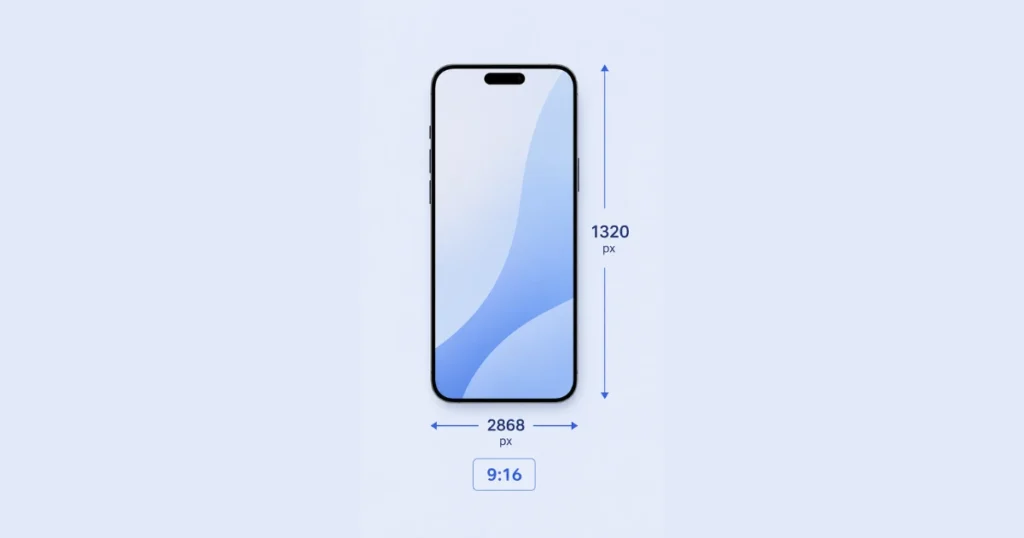
The standard iPhone wallpaper dimensions are 2796 × 1290 pixels at a 9:16 aspect ratio. For the latest iPhone 16 Pro Max, the recommended size goes up to 2868 × 1320 pixels. Using the exact resolution for your model keeps images sharp, properly framed, and free from automatic cropping by iOS.
Getting the size wrong results in blurry, stretched, or awkwardly cropped wallpapers — even if your original image looks perfect on a desktop screen.
iPhone Wallpaper Size by Model
Every iPhone model has a unique screen resolution. Using the exact pixel dimensions for your device gives the sharpest, most accurate wallpaper display.
iPhone Wallpaper Aspect Ratio Explained

The correct aspect ratio for iPhone wallpapers is 9:16. This is the standard vertical (portrait) format that fills an iPhone screen from edge to edge.
A 9:16 image is taller than it is wide — the opposite of a widescreen 16:9 video format. If you set a 16:9 landscape image as an iPhone wallpaper, iOS will either crop it heavily or zoom in to fill the screen, cutting off important parts of the image.
Common aspect ratios behave on an iPhone screen
Always create or export wallpapers in 9:16 before setting them on any iPhone model.
iPhone Home Screen vs. Lock Screen Wallpaper Dimensions

iOS displays two separate wallpapers — one for the Lock Screen and one for the Home Screen. Both use the same resolution but behave differently.
Lock Screen wallpaper is the full background image displayed when your phone is locked. It uses your screen’s full native resolution with maximum detail and depth effect support.
Home Screen wallpaper sits behind your app icons. iOS applies a slight blur and darkening effect by default to improve icon readability. The image resolution requirement is identical — but busy, detailed images can look cluttered behind app grids.
What most guides miss: iOS 16 and later introduced separate customizable Lock Screen and Home Screen wallpapers with widget layers. If your wallpaper looks sharp on the Lock Screen but blurry on the Home Screen — or vice versa — it’s because iOS applies different rendering to each layer. Using full native resolution images prevents quality loss on both screens.
Universal iPhone Wallpaper Size (Works on All Models)
If you design wallpapers for multiple iPhone models or share them publicly, use these universal specifications:
- Resolution: 2868 × 1320 px (covers all current models)
- Aspect Ratio: 9:16
- Color Space: sRGB or Display P3 (for True Tone compatibility)
- File Format: JPEG for photos, PNG for graphics or illustrations
- File Size: Keep under 5MB for fast loading
For 4K universal quality across all smartphones — both iPhone and Android — use 3840 × 2160 pixels. This exceeds every current iPhone screen and will look pristine on any device.
Resize a Photo to Fit iPhone Wallpaper
If your image isn’t the right size, resizing it to 9:16 is straightforward with the right tool.
On iPhone (Built-In): Open the photo in the Photos app, tap Edit, then use the crop tool. Select the 9:16 ratio from the aspect ratio options and adjust the frame around your subject.
Online Tools: Kapwing, Adobe Express, and Canva all offer free 9:16 crop presets — upload your image, select 9:16, and export at maximum resolution.
On Desktop: In Photoshop or Lightroom, set the crop ratio to 9:16 and export at 300 DPI with a minimum width of 1290 pixels for full sharpness on a Retina display.
Simply cropping to 9:16 isn’t always enough. If your original image is low resolution — under 1080px wide — upscaling it to 2796 × 1290 will produce a noticeably soft or pixelated wallpaper. Start with the highest resolution source image available, then crop and resize.
iPhone Wallpaper vs. Android Wallpaper Dimensions
iPhone and Android wallpaper sizes are different — you can’t always use the same file for both.
Android devices vary much more widely in resolution and aspect ratio than iPhones. If you’re creating wallpapers for both platforms, a 4K (3840 × 2160) image is the safest universal starting size — most devices will crop or scale it acceptably.
More Post: Pickleball Court Dimensions
(Questions)
Is 16:9 the right wallpaper size for iPhone?
No. iPhone wallpapers use a 9:16 aspect ratio, not 16:9. A 16:9 image is landscape-oriented and will be heavily cropped to fill a portrait phone screen. Always use 9:16 for correct iPhone wallpaper formatting.
What ratio is iPhone 16 wallpaper?
The iPhone 16 wallpaper ratio is 9:16, with a recommended resolution of 2796 × 1290 pixels. The iPhone 16 Pro Max uses a slightly larger 2868 × 1320 px resolution due to its larger screen.
How do I resize a photo to fit an iPhone wallpaper?
Open the image in the Photos app, tap Edit, and use the crop tool with a 9:16 aspect ratio. For more control, use a free online tool like Kapwing or Canva — select the 9:16 preset, crop to your subject, and export at maximum resolution before saving to your phone.
What is the iPhone 17 wallpaper ratio?
The iPhone 17 wallpaper ratio is 9:16, with a resolution of 2796 × 1290 pixels. The iPhone 17 Pro Max uses 2868 × 1320 pixels. Both use the same aspect ratio as previous Pro models but with slightly increased pixel density.
What is the best universal iPhone wallpaper size?
The best universal size is 2868 × 1320 pixels at 9:16. This matches the highest current iPhone screen resolution and scales down cleanly on all older models. For cross-device use on both iPhone and Android, a 4K image (3840 × 2160 px) works on any modern smartphone.

Hi, I’m Aria Blake, the author at FramesSize.com. I help make measurements simple with clear guides, easy explanations, and practical size comparisons. Explore our content to understand dimensions, frame sizes, lengths, and everyday measurements quickly and confidently.