The ideal YouTube video dimensions depend on your content type. For standard widescreen videos, the recommended size is 1920 × 1080 pixels at a 16:9 aspect ratio. For YouTube Shorts and vertical content, flip that to 1080 × 1920 at a 9:16 aspect ratio.
Getting your dimensions right means sharper video, fewer compression issues, and a better experience for every viewer — on desktop, mobile, and TV.
YouTube Video Dimensions by Format
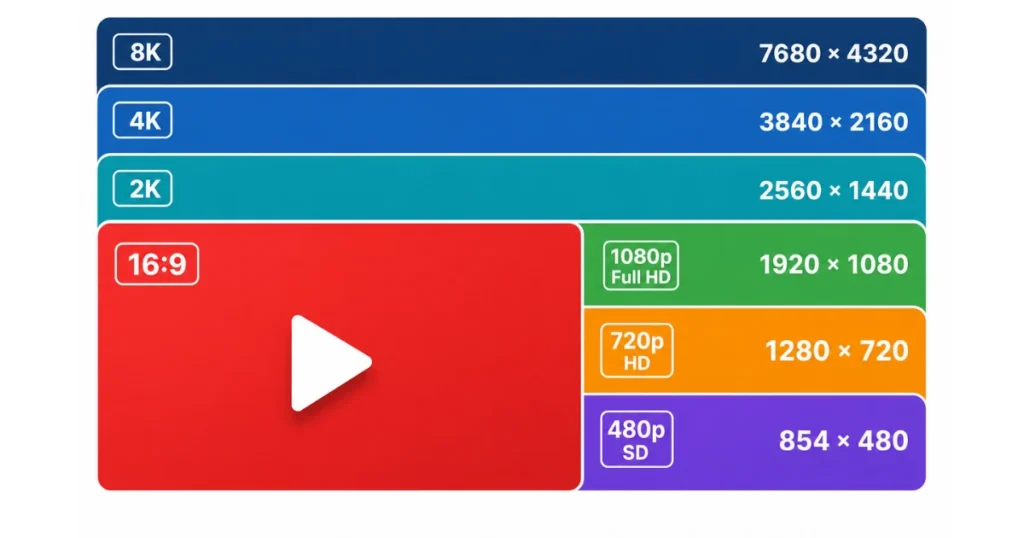
YouTube supports multiple resolutions, but not every format fits every screen. The right dimensions depend on whether you’re uploading a standard video, a Short, or a thumbnail.
Standard Landscape Video Dimensions (16:9)
The 16:9 aspect ratio is the universal standard for desktop, TV, and most YouTube content. YouTube officially recommends these pixel dimensions for landscape uploads:
1080p (1920 × 1080) is the most widely used resolution on YouTube. It balances sharp visual quality with manageable file size — making it the go-to choice for most creators.
What most guides skip: Uploading at a higher resolution like 4K — even for a 1080p final product — can improve perceived quality. YouTube’s compression engine applies less aggressive encoding to higher-resolution uploads, which means your 1080p video can actually look crisper when uploaded as a 4K file.
YouTube Shorts and Vertical Video Dimensions (9:16)
YouTube Shorts and all vertical content use the 9:16 aspect ratio — designed specifically for mobile screens.
Always shoot and export at 1080 × 1920 for Shorts. Lower resolutions like 720 × 1280 are supported but will look noticeably softer — especially on modern smartphone screens.
One thing most creators miss: If you upload a horizontal video as a Short, YouTube will crop it automatically — cutting off the sides. Always export vertical content in the correct 9:16 format before uploading.
YouTube Thumbnail Dimensions
Your thumbnail is the first thing viewers see. A blurry or incorrectly sized thumbnail hurts click-through rate before anyone even watches.
YouTube’s official thumbnail specifications:
- Dimensions: 1280 × 720 pixels
- Aspect Ratio: 16:9
- Minimum Width: 640 pixels
- Max File Size: 2MB
- Accepted Formats: JPG, PNG, GIF, BMP, WebP
Always design thumbnails at 1280 × 720. This size renders crisply at every display size — from mobile preview cards to large desktop grids.
YouTube Aspect Ratios Explained

Aspect ratio is the relationship between a video’s width and height. It determines how your video looks on different screens — and whether black bars appear around your content.
16:9 is YouTube’s native player format. Any other ratio will either be letterboxed (horizontal black bars), pillarboxed (vertical black bars), or cropped depending on the player.
YouTube Video File Size and Format Guidelines
Dimensions matter — but so does your file format and size. Uploading in the wrong format can trigger heavy re-encoding, reducing quality.
YouTube’s recommended video formats:
- MP4 with H.264 codec — most widely supported and best compression
- MOV, AVI, WMV, FLV — all supported but less efficient than MP4
- WebM — excellent for web but less common in editing workflows
Maximum file size: 256GB per upload. Maximum video length: 12 hours.
For best results, export as MP4 (H.264) at your target resolution with a frame rate of 24, 25, or 30fps for standard content — or 48, 50, or 60fps for gaming, sports, or high-motion video.
Recommended YouTube Video Settings at a Glance
More Post: Garage Door Dimensions
(Question’s)
Is YouTube 16:9 or 4:3?
YouTube’s native player uses a 16:9 aspect ratio. The 4:3 ratio is a legacy format from older television standards. If you upload a 4:3 video, YouTube will add black bars on the sides to fit its 16:9 player.
What size is a 1920 × 1080 video frame?
A 1920 × 1080 frame is Full HD — 1,920 pixels wide and 1,080 pixels tall. It is the most common resolution for YouTube uploads and the standard for HD broadcasts worldwide.
Is 1920 × 1080 the same as 4:3?
No. 1920 × 1080 is a 16:9 aspect ratio, not 4:3. Dividing 1920 by 1080 gives 1.78 — which equals 16:9. A true 4:3 resolution at 1080 height would be 1440 × 1080.
Is 1920 × 1080 a 16:9 ratio?
Yes. 1920 × 1080 is a 16:9 aspect ratio. It is the standard Full HD resolution and YouTube’s most recommended upload size for landscape video content.
What is the best resolution for YouTube Shorts?
The best resolution for YouTube Shorts is 1080 × 1920 pixels at a 9:16 aspect ratio. This fills a mobile screen completely with no cropping or black bars.

Hi, I’m Aria Blake, the author at FramesSize.com. I help make measurements simple with clear guides, easy explanations, and practical size comparisons. Explore our content to understand dimensions, frame sizes, lengths, and everyday measurements quickly and confidently.